In the previous article, we built a RAG with LangChain4j. In this post, we’ll build the same RAG using Spring AI.
What is Spring AI ? Link to heading
Like LangChain4J, Spring AI provides an unifies abractions over all major AI Model providers such as Anthropic, OpenAI, Microsoft, Amazon, Google, and Ollama, severals embedding models and vector stores.
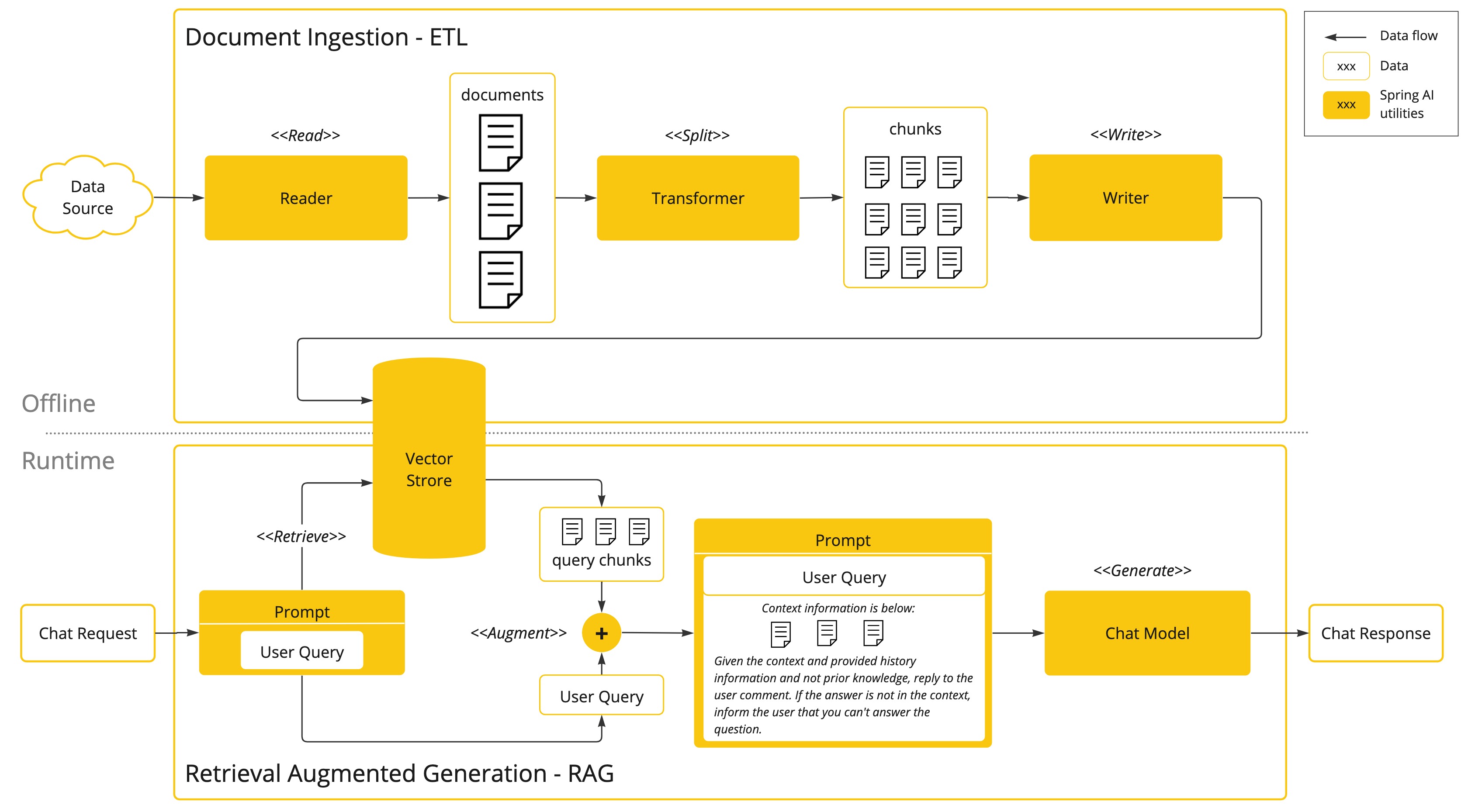
RAG Architecture Overview Link to heading
To learn about RAG Architecture, please refer to the last article. In brief we have to phases :
- Indexing phase : Load -> Parse -> Split -> Embed -> Store
- Retrieval phase : User Question -> Embed -> Retrieve from Store -> Generate answer
Spring dependencies Link to heading
Several dependencies are required to build the RAG
<!-- Spring Boot auto-configuration for the Ollama chat integration. -->
<dependency>
    <groupId>org.springframework.ai</groupId>
    <artifactId>spring-ai-starter-model-ollama</artifactId>
</dependency>
<!-- A document reader that leverages Apache Tika to extract text from PDF, DOC/DOCX, PPT/PPTX, and HTML. -->
<dependency>
    <groupId>org.springframework.ai</groupId>
    <artifactId>spring-ai-tika-document-reader</artifactId>
</dependency>
<!-- For the Transformer Embedding model -->
<dependency>
    <groupId>org.springframework.ai</groupId>
    <artifactId>spring-ai-transformers</artifactId>
</dependency>
<!-- Client to perform stateless requests to an AI Model -->
<dependency>
    <groupId>org.springframework.ai</groupId>
    <artifactId>spring-ai-client-chat</artifactId>
</dependency>
<!-- Abstracted API for interacting with vector databases -->
<dependency>
    <groupId>org.springframework.ai</groupId>
    <artifactId>spring-ai-vector-store</artifactId>
</dependency>
Implement the indexing phase Link to heading
The indexing phase runs at application startup. We load documents, split them into chunks, embed each chunk, and store the vectors.
First, we declare the VectorStore bean. Here we use SimpleVectorStore, an in-memory store. Other stores are available here.
The EmbeddingModel is auto-configured by Spring AI based on the model set in application.properties
spring.ai.ollama.embedding.model=bge-m3
@Bean
public SimpleVectorStore vectorStore(EmbeddingModel embeddingModel) {
    return SimpleVectorStore.builder(embeddingModel).build();
}
Load and parse documents Link to heading
In Spring AI, TikaDocumentReader handles both loading and parsing. It uses Apache Tika under the hood to auto-detect the format (PDF, DOCX, HTML, etc.) and extract the text.
DocumentReader reader = new TikaDocumentReader(
        new ClassPathResource("docs/AVE_P_Communication_Conditionnement_5.0.1.pdf"));
List<Document> documents = reader.read();
Split, embed and store Link to heading
We now have a list of Document objects. We need to split them into smaller chunks, embed each chunk, and store the vectors.
DocumentTransformer splitter = TokenTextSplitter.builder().build();
List<Document> chunks = splitter.apply(documents);

// Under the hood, the store calls EmbeddingModel.embed() for each document (or in batches), attaches the vectors, and persists them along with metadata.
vectorStore.add(chunks);
When we call vectorStore.add(chunks), the store calls EmbeddingModel.embed() for each document (or in batches), attaches the resulting vectors, and persists them alongside the text and metadata.
Document doesn’t mean “a file”, it represent a piece of text + metadata + an id. That’s why splitter.apply() returns a List<Document> rather than a separate Chunk type.Implement the retrieval step Link to heading
Our documents are indexed. Now when a user asks a question, we need to find the relevant chunks, stuff them into the prompt, and let the LLM answer.
The ChatClient Link to heading
The ChatClient is created using a ChatClient.Builder object. You can obtain an autoconfigured ChatClient.Builder instance for any ChatModel Spring Boot autoconfiguration or create one programmatically. documentation
spring.ai.ollama.chat.model=llama3.2
And we have to declare a new Bean
@Bean
ChatClient defaultChatClient(ChatClient.Builder builder) {
    return builder.build();
}
Embed the question, retrieve and generate the answer Link to heading
The entire retrieval pipeline fits in a single method :
- We build a
SearchRequestand callvectorStore.similaritySearch(), the store embeds the question using the sameEmbeddingModelfrom the indexing phase, then finds the top-K most similar chunks - We concatenate the retrieved documents into a single context string
- We pass that context along with the user’s question to the
ChatClient, which sends the prompt to the LLM and returns the answer
public String ask(String question) {
    SearchRequest vectorRequest = SearchRequest.builder()
            .query(question)
            .topK(5)
            .similarityThreshold(0.5)
            .build();
    List<Document> documents = vectorStore.similaritySearch(vectorRequest);

    if (documents.isEmpty()) {
        return "No relevant documents found";
    }

    String context = documents.stream()
            .map(Document::getText)
            .collect(Collectors.joining("\n---\n"));

    return chatClient.prompt()
            .system("""
                    Tu réponds UNIQUEMENT à partir du contexte fourni.
                    Si le contexte ne contient pas la réponse, dis-le explicitement.
                    Réponds en français.""")
            .user(u -> u.text("""
                    Contexte:
                    {context}

                    Question: {question}""")
                    .param("context", context)
                    .param("question", question))
            .call()
            .content();
}
Alternative: using QuestionAnswerAdvisor Link to heading
In the previous section, we manually embedded the question, retrieved documents, and built the prompt. Spring AI provides QuestionAnswerAdvisor which does all of this automatically.
<dependency>
    <groupId>org.springframework.ai</groupId>
    <artifactId>spring-ai-vector-store-advisor</artifactId>
</dependency>
We improve the ChatClient bean with the advisor configured. The QuestionAnswerAdvisor intercepts every call: it embeds the user’s question, searches the VectorStore, and injects the retrieved documents into the prompt
@Bean
ChatClient defaultChatClient(ChatClient.Builder builder, VectorStore vectorStore) {
    return builder
            .defaultAdvisors(QuestionAnswerAdvisor.builder(vectorStore)
                    .searchRequest(SearchRequest.builder()
                            .topK(5)
                            .similarityThreshold(0.5)
                            .build())
                    .promptTemplate(new PromptTemplate("""
                            Contexte:
                            ---------------------
                            {question_answer_context}
                            ---------------------

                            Question: {query}

                            Tu réponds UNIQUEMENT à partir du contexte fourni.
                            Si le contexte ne contient pas la réponse, dis-le explicitement.
                            Réponds en français."""))
                    .build())
            .build();
}
Then, the ask() method becomes trivial, the advisor handles the RAG logic behind the scenes
public String ask(String question) {
    return chatClient.prompt()
            .user(question)
            .call()
            .content();
}
Conclusion Link to heading
We built a complete RAG with Spring AI in two phases:
- Indexing: load documents with
TikaDocumentReader, split them withTokenTextSplitter, and store the vectors in aVectorStore - Retrieval: search for relevant chunks and generate an answer with
ChatClient- Spring AI’s
QuestionAnswerAdvisorcan reduce the retrieval step to a single method call.
- Spring AI’s