- GitHub project : https://github.com/Adrien-Courses/Spring-Security-oauth2.git
In the previous articles (Spring Security Theory and Spring Security Minimum) the application was in charge of checking the user’s credentials itself (username + password, UserDetailsService, PasswordEncoder…). In this tutorial we delegate the authentication to a third party: GitHub. This is what happens every time you click on a “Login with GitHub / Google” button.
We will proceed in two steps:
- A minimal OAuth2 client with Spring Boot and the default login page generated by Spring Security. The goal is to understand the flow with as little code as possible.
- A real frontend in ReactJS. The default login page disappears (no more
formLogin) and we see what has to change on the backend.
A bit of vocabulary Link to heading
Before writing code, let’s name the actors. OAuth2 defines four roles:
| Role | In our example |
|---|---|
| Resource Owner | You, the user who owns a GitHub account |
| Client | Our Spring Boot application, which wants to know who you are |
| Authorization Server | GitHub, which authenticates you and delivers tokens |
| Resource Server | GitHub API (https://api.github.com/user), which returns your profile |
Spring Security plays the Client role here, which is why the dependency is called spring-boot-starter-oauth2-client.
In this article we use the Authorization Code flow: the browser never sees the access token, it only carries a short-lived code that the backend exchanges for a token. This is the recommended flow for web applications.
Part 1: the minimal OAuth2 client Link to heading
- GitHub project part1 : https://github.com/Adrien-Courses/Spring-Security-oauth2/tree/part1-spring-formlogin
Step 1: register an OAuth App on GitHub Link to heading
GitHub must know our application before accepting to authenticate users for it.
- Go to GitHub > Settings > Developer settings > OAuth Apps > New OAuth App
- Fill in:
- Homepage URL:
http://localhost:8080 - Authorization callback URL:
http://localhost:8080/login/oauth2/code/github
- Homepage URL:
- Generate a client secret and keep the client id and client secret somewhere safe.
The callback URL is not random: /login/oauth2/code/{registrationId} is the URL Spring Security listens on to receive the code sent back by GitHub. github is the registrationId we will use in the configuration.
Step 2: Maven dependencies Link to heading
<dependency>
    <groupId>org.springframework.boot</groupId>
    <artifactId>spring-boot-starter-web</artifactId>
</dependency>
<dependency>
    <groupId>org.springframework.boot</groupId>
    <artifactId>spring-boot-starter-oauth2-client</artifactId>
</dependency>
spring-boot-starter-oauth2-client transitively brings spring-boot-starter-security, no need to add it.
Step 3: application.properties Link to heading
# GitHub Login
spring.security.oauth2.client.registration.github.client-id=${GITHUB_CLIENT_ID}
spring.security.oauth2.client.registration.github.client-secret=${GITHUB_CLIENT_SECRET}
spring.security.oauth2.client.registration.github.redirect-uri={baseUrl}/login/oauth2/code/{registrationId}
A few remarks:
- Never commit the client secret. Using
${GITHUB_CLIENT_ID}makes Spring read it from an environment variable. {baseUrl}and{registrationId}are placeholders resolved by Spring at runtime, here intohttp://localhost:8080/login/oauth2/code/github. It is exactly the callback URL declared on GitHub. This line is actually the default value, we write it only to make it visible.- We do not declare where GitHub is (authorization URL, token URL, user-info URL). GitHub, Google, Facebook and Okta are known by Spring Security (see
CommonOAuth2Provider), so theregistrationIdgithubis enough. For another provider (Keycloak, Auth0…) you would addspring.security.oauth2.client.provider.*properties.
Step 4: the security configuration Link to heading
@Configuration
@EnableWebSecurity
public class OAuth2ClientSecurityConfig {
    @Bean
    public SecurityFilterChain filterChain(HttpSecurity http) throws Exception {
        return http.authorizeHttpRequests(authz -> authz
                        .requestMatchers("/public").permitAll()
                        .anyRequest().authenticated()
                )
                .oauth2Login(withDefaults())
                .formLogin(withDefaults())
                .build();
    }
}
Line by line:
authorizeHttpRequests:/publicis open to everybody, every other URL requires an authenticated user.oauth2Login(withDefaults()): enables the OAuth2 login. It registers two filters in theSecurityFilterChain(we come back to them below).formLogin(withDefaults()): enables the classic username/password form. It is not required for OAuth2; we keep it only so that Spring generates its default login page at/login, which shows both the form and a link per OAuth2 provider. It will be removed in part 2.
Step 5: a controller to test Link to heading
@RestController
public class HelloController {

    @GetMapping("/public")
    public String publicPage() {
        return "Everybody can see this page";
    }

    @GetMapping("/private")
    public String privatePage(@AuthenticationPrincipal OAuth2User user) {
        return "Hello " + user.getAttribute("login");
    }
}
OAuth2User is the principal stored in the SecurityContext once the user is authenticated. Its attributes are the JSON returned by https://api.github.com/user (login, name, avatar_url…).
Step 6: connection to the private page Link to heading
Start the application and go to http://localhost:8080/private.
- You are not authenticated, so Spring redirects you to the default login page
/login. Click on GitHub.
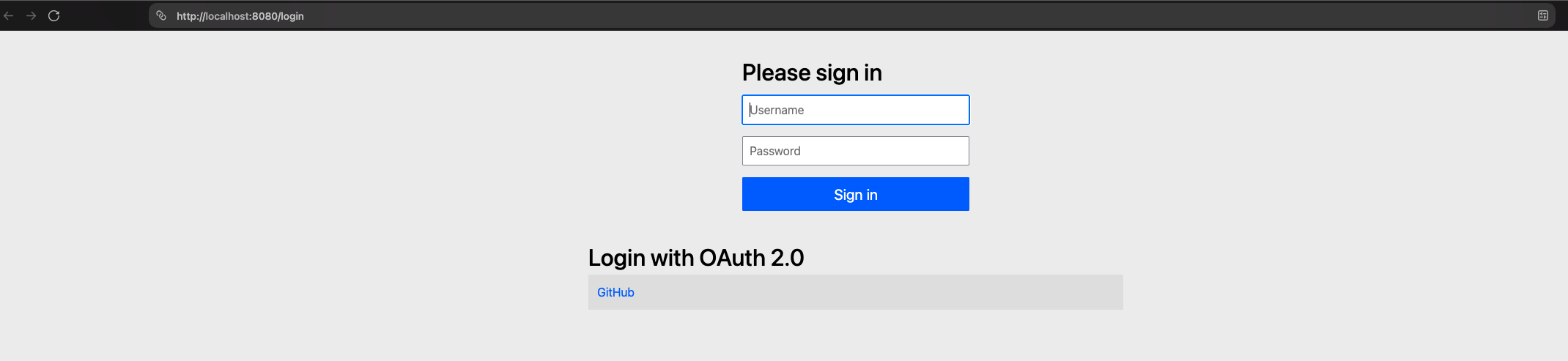
- You are redirected to GitHub, which asks for your credentials. Notice that the password is typed on github.com, never on our application: this is the whole point of OAuth2.

- After authorizing the application, you come back to
http://localhost:8080/privateand seeHello <your-github-login>.
What happened under the hood? Link to heading
Let’s replay the flow with the Spring Security components involved:
GET /private→ theAuthorizationFilterrejects the anonymous request, the user is redirected to/login.- Clicking on GitHub calls
GET /oauth2/authorization/github. TheOAuth2AuthorizationRequestRedirectFilterbuilds the authorization URL (client_id,redirect_uri,scope, a randomstate) and redirects the browser tohttps://github.com/login/oauth/authorize. - The user authenticates on GitHub and accepts.
- GitHub redirects the browser to
/login/oauth2/code/github?code=...&state=.... - The
OAuth2LoginAuthenticationFilterchecks thestate(protection against CSRF), then exchanges thecode+client_secretfor an access token. This call is made server to server: the browser never sees the token. - With this access token, Spring calls
https://api.github.com/userand builds anOAuth2User. - An
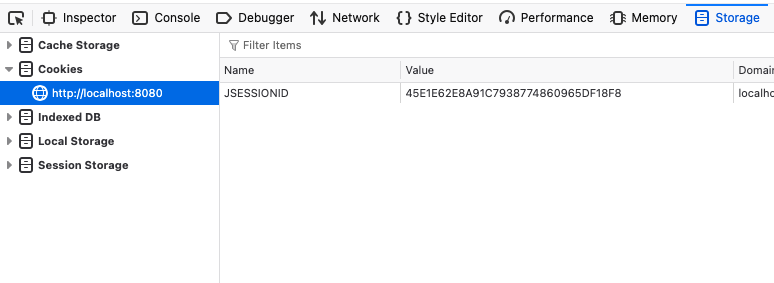
OAuth2AuthenticationTokenis stored in theSecurityContext, which is saved in the HTTP session (JSESSIONIDcookie). The user is redirected to the URL they initially requested:/private.
The /oauth2/authorization/github endpoint
Link to heading
The GitHub link on the login page points to /oauth2/authorization/github. This is the endpoint that starts the OAuth2 authentication flow. We never wrote a controller for it: it is managed by Spring Security, which creates one endpoint per registration with the pattern /oauth2/authorization/{registrationId}.
To check it, call it directly: open http://localhost:8080/oauth2/authorization/github in your browser and you land straight on the GitHub login page, without going through /login.
From now on, every request carries the JSESSIONID cookie: GitHub is not contacted anymore, the session is enough.
If you look at the GitHub URL in the screenshot, you will notice
code_challengeandcode_challenge_method=S256parameters: this is PKCE, an additional protection that guarantees that the one who exchanges the code is the one who started the flow.
Part 2: but how to handle it with a real ReactJS frontend? Link to heading
The default login page is fine to understand the mechanism, but a real application has its own frontend. Let’s say a React application (Vite) running on http://localhost:5173 while Spring stays on http://localhost:8080.
This raises several questions:
- The login page now belongs to React, so
formLoginand the page generated by Spring are useless. - When an API call is made by
fetchwithout being authenticated, a redirect to/loginmakes no sense: React expects an HTTP status (401) to decide what to display. - After the login, the user must come back to the React app, not to the backend.
- Two different ports means two different origins: we have to deal with CORS… or avoid it.
Architecture choice: the backend stays the OAuth2 client Link to heading
We keep exactly the same OAuth2 flow as in part 1: Spring Boot remains the OAuth2 client, it stores the token in the session, and React only knows the JSESSIONID cookie. The access token never reaches the browser, which protects it from XSS attacks. This pattern is called BFF (Backend For Frontend).
To avoid CORS, we use the Vite proxy: from the browser point of view, everything is served by localhost:5173.
// vite.config.js
export default defineConfig({
  plugins: [react()],
  server: {
    proxy: {
      '/api': 'http://localhost:8080',
      '/oauth2': 'http://localhost:8080',
      '/login': 'http://localhost:8080',
    },
  },
})
Because the proxy keeps the Host header, the {baseUrl} placeholder of the redirect-uri is now resolved into http://localhost:5173. So update the callback URL on GitHub: http://localhost:5173/login/oauth2/code/github.
The new security configuration Link to heading
@Configuration
@EnableWebSecurity
public class OAuth2ClientSecurityConfig {
    @Bean
    public SecurityFilterChain filterChain(HttpSecurity http) throws Exception {
        return http.authorizeHttpRequests(authz -> authz
                        .requestMatchers("/api/public").permitAll()
                        .anyRequest().authenticated()
                )
                // 1. Return 401 instead of redirecting to /login
                .exceptionHandling(e -> e
                        .authenticationEntryPoint(new HttpStatusEntryPoint(HttpStatus.UNAUTHORIZED))
                )
                // 2. After a successful login, go back to the React app
                .oauth2Login(oauth2 -> oauth2
                        .defaultSuccessUrl("/", true)
                )
                // 3. No more formLogin
                .build();
    }
}
What changed compared to part 1:
formLoginis removed: React owns the login page.HttpStatusEntryPoint: an unauthenticated call to/api/**now receives a401instead of a302to an HTML page thatfetchcould not use.defaultSuccessUrl("/", true): once the OAuth2 flow is over, the user lands on/, which is served by React (through the proxy).trueforces this URL even if another page was requested before.
The React side Link to heading
function App() {
  const [user, setUser] = useState(null)
  const [loading, setLoading] = useState(true)

  useEffect(() => {
    fetch('/api/me')
      .then(res => (res.ok ? res.json() : null))
      .then(setUser)
      .finally(() => setLoading(false))
  }, [])

  const login = () => {
    // A full page navigation, not a fetch: the browser must follow the redirects to GitHub
    window.location.href = '/oauth2/authorization/github'
  }

  if (loading) return <p>Loading...</p>

  return user
    ? <p>Hello {user.name ?? user.login}</p>
    : <button onClick={login}>Login with GitHub</button>
}
Two important points:
- The login is a full page navigation (
window.location.href), not afetch. The OAuth2 flow is a succession of browser redirects between our app and GitHub; an AJAX call cannot follow them. - Since React and the API share the same origin (thanks to the proxy), the
JSESSIONIDcookie is sent automatically with everyfetch, withoutcredentials: 'include'nor CORS configuration.
The full flow is now:
- Go to the private page
- Click →
/oauth2/authorization/github→ GitHub →/login/oauth2/code/github(call back url). - Spring redirects to
/→ React reloads, calls/api/me→200with the user profile.
If you access to http://localhost:5173/api/me without being logged in, you get a 401, but after login you access to your profile

Note about the proxy Link to heading
Why does React call /api/me and not http://localhost:8080/api/me? Because the browser only ever talks to Vite on port 5173. Vite then forwards the request to Spring on port 8080, from server to server:
Browser ──GET /api/me──▶ Vite :5173 ──GET /api/me──▶ Spring :8080
        ◀── response ───            ◀── response ───
From the browser point of view, the React page, the API and the OAuth2 endpoints all live on the same origin: http://localhost:5173.
Why not call port 8080 directly from React? A page loaded from localhost:5173 that fetches localhost:8080 makes a cross-origin request: a different port means a different origin. That brings two problems:
- CORS: Spring would have to allow
http://localhost:5173in a CORS configuration, with credentials enabled. - The session cookie:
fetchonly sendsJSESSIONIDto another origin if you addcredentials: 'include'to every call.
The proxy avoids both. Keep in mind that it only exists in development (npm run dev); in production the same role is played by a reverse proxy (Nginx, ingress…) serving React and Spring on the same domain.